Creating circular speaker grill holes in Freecad
February 11, 2024: Creating a circular hole pattern
I found it surprisingly difficult to create a circular speaker grill pattern in Freecad. Filling a diameter with many small holes was not easily achieved by standard tools. I also tried to use Lattice2 Workbench, to no avail. I finally found a solution using a Python script.
The solution
The solution I came up with and which solves my issue is to copy past a Python script in to the Python ConsoleView->Panels->Python Console of Freecad.
This generates a new file, fills it with holes, pads them and finally fuses the result in to one big fused object.
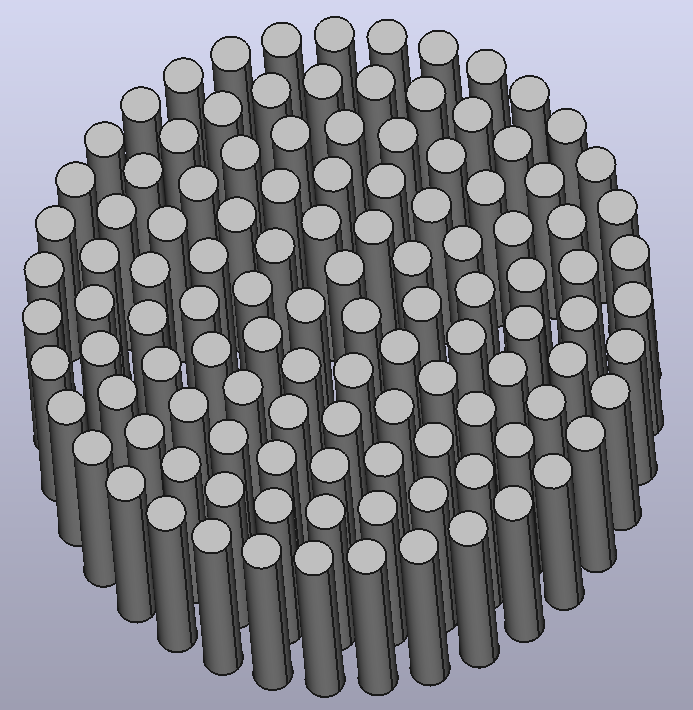
I then copied the fused object in to my working file, transformed it via Right Click->Transform and applied a boolean operation to both objects.
I had to apply the boolean operation in the “Part” Workspace, not in “Part Design”.
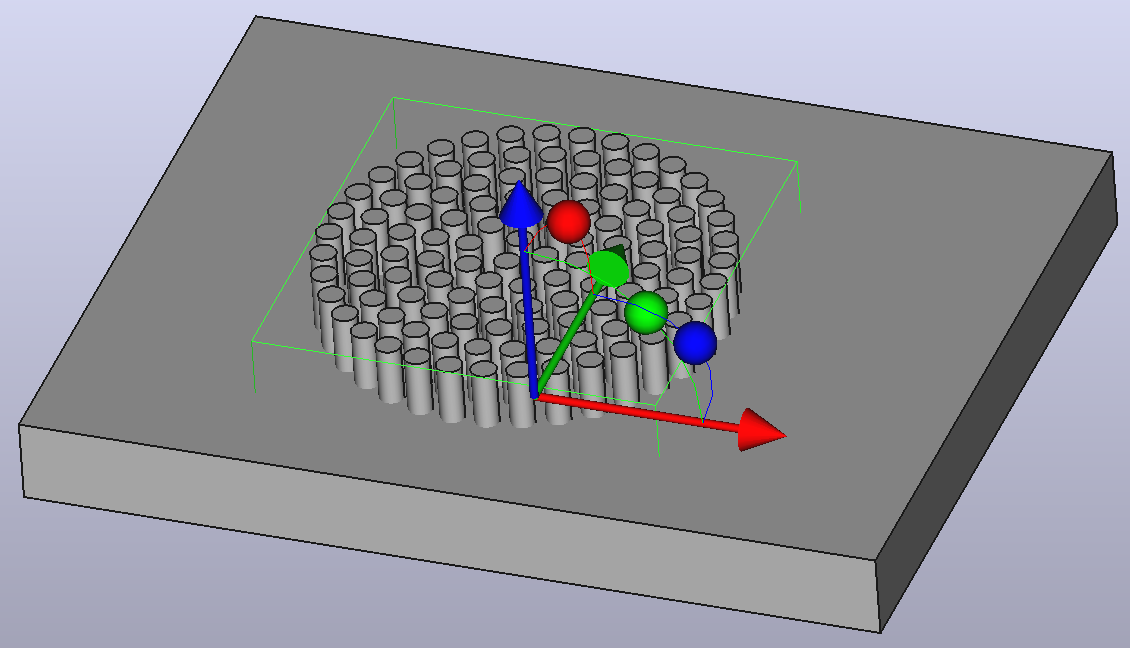
The result is a speaker grill pattern in any object you desire, the volume can even be curved or otherwise irregular.
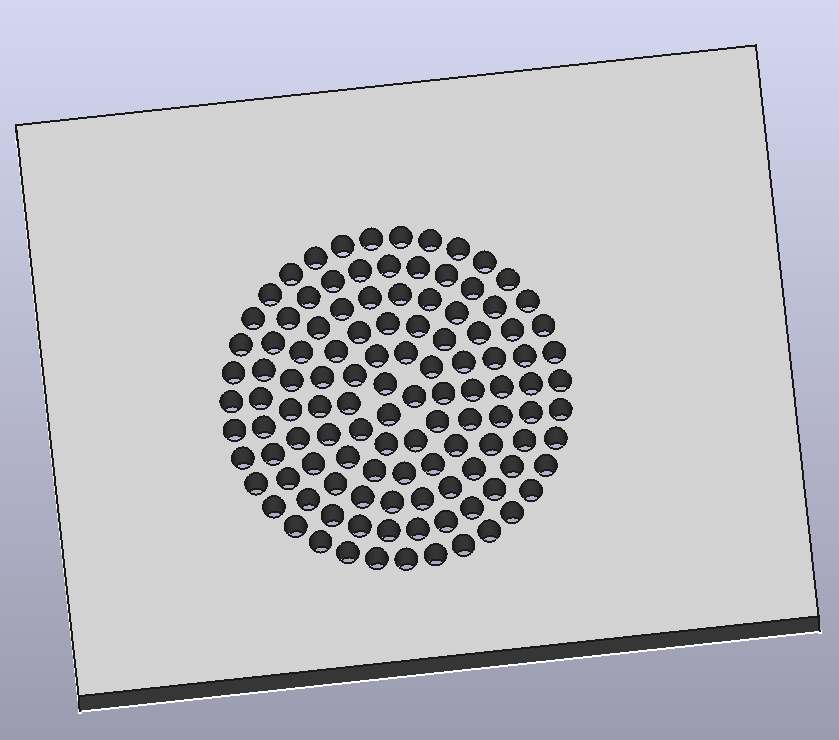
The script
Here is the script I Well, mostly Chatgpt came up with.
import math
from FreeCAD import Base
import Part

# Parameters
fn = 100  # Smoothness of circles
grillDiameter = 50  # in mm
holeDiameter = 3  # in mm
holeSpacing = 1  # in mm
height = 20  # in mm

# Calculate radii and spacing
grillRadius = grillDiameter / 2
holeRadius = holeDiameter / 2
ringSpacing = holeDiameter + holeSpacing

# Create document
doc = FreeCAD.newDocument()

def createRingOfHoles(radius):
    numOfHoles = math.floor((2 * math.pi * radius) / (holeDiameter + holeSpacing))
    for i in range(numOfHoles):
        angle = (360 / numOfHoles) * i
        x = radius * math.cos(math.radians(angle))
        y = radius * math.sin(math.radians(angle))

        # Create circle for each hole
        circle = Part.Circle(Base.Vector(x, y, 0), Base.Vector(0, 0, 1), holeRadius)
        circleShape = circle.toShape()
        Part.show(circleShape)

# Iterate over rings to create
currentRadius = holeRadius + holeSpacing
while currentRadius < grillRadius:
    createRingOfHoles(currentRadius)
    currentRadius += ringSpacing

# Extrude the sketch (2D profile to 3D)
for obj in FreeCAD.ActiveDocument.Objects:
    if "Shape" in obj.Label:
        pad = doc.addObject("PartDesign::Pad", "Pad")
        pad.Profile = obj
        pad.Length = height

FreeCADGui.activeDocument().activeView().viewIsometric()
FreeCADGui.updateGui()
doc.recompute()
import Part

# Assuming 'doc' is your current document and extrusions have been created
doc = FreeCAD.activeDocument()

# Collect all extrusions (Assumes all extrusions are named 'Pad')
extrusions = [obj for obj in doc.Objects if obj.TypeId == "PartDesign::Pad"]

# Use Part.makeSolid() if needed to ensure all shapes are solids
solid_shapes = [Part.makeSolid(ex.Shape) for ex in extrusions]

# Fuse using Part Fuse operation
fused_shape = solid_shapes[0]
for shape in solid_shapes[1:]:
    fused_shape = fused_shape.fuse(shape)

# Create a new object for the fused shape
fused_object = doc.addObject("Part::Feature", "FusedObject")
fused_object.Shape = fused_shape

# Recompute the document to apply changes
doc.recompute()
OpenSCAD
I initially tried to create the hole pattern in OpenSCAD. While I was able to create the same pattern there, I had no way to directly create a boolean from the resulting stl.
Converting it to a “Solid” was possible, but the result seemed to not be able to be subtracted successfully. FreeCAD just never stopped calculating and had to be killed.
Here is the script I used to generate the pattern there, maybe it will be of use to somebody.
// Parameters
$fn=100; // Increase for smoother circles
grillDiameter = 50; // diameter of the grill in mm
holeDiameter = 3; // diameter of each hole in mm
holeSpacing = 1; // spacing between holes in mm
height=20;

// Calculate radius values
grillRadius = grillDiameter / 2;
holeRadius = holeDiameter / 2;
ringSpacing = holeDiameter + holeSpacing; // center to center spacing between rings

// Function to create a single ring of holes
module ringOfHoles(ringRadius) {
    // Calculate the number of holes that can fit around the current ring
    //numOfHoles = floor(PI * ringRadius / (holeDiameter + holeSpacing));
    numOfHoles = floor((2 * PI* ringRadius) / (holeDiameter+holeSpacing));
    for(i = [0 : numOfHoles - 1]) {
        // Position each hole using polar coordinates (angle and radius)
        angle = 360 / numOfHoles * i;
        translate([ringRadius * cos(angle), ringRadius * sin(angle), 0]) {f
            cylinder(height , d = holeDiameter, $fn = $fn);
        }
    }
}


//create base for processing (only one body)
union() {
// Creating the grill with holes
difference() {
    // Create the main cylindrical body of the grill
    //cylinder(h = 5, d = grillDiameter, $fn = $fn);

    // Subtract the holes
    for(r =  [0:   ringSpacing:  grillRadius - holeRadius+0.5]) {
        echo(r)
        ringOfHoles(r);
    }
}
cylinder(h = 5, d = grillDiameter, $fn = $fn);
}

// Render the model
Future work
I would really like to create this hole pattern in some other forms: it would be neat if you could somehow create a bunny, or smile as a speaker grill pattern. I suppose you would ahve to have some black and white “pattern” of what you want and then calculate if the next circle is still inside this pattern or not. You could even adjust the radius of the circles according to the intensity of the color.