Reverse engineering the protocol of a BLE lamp to integrate it in HomeAssistant
January 15, 2023: Creating a HACS integration for a lamp in HomeAssistant
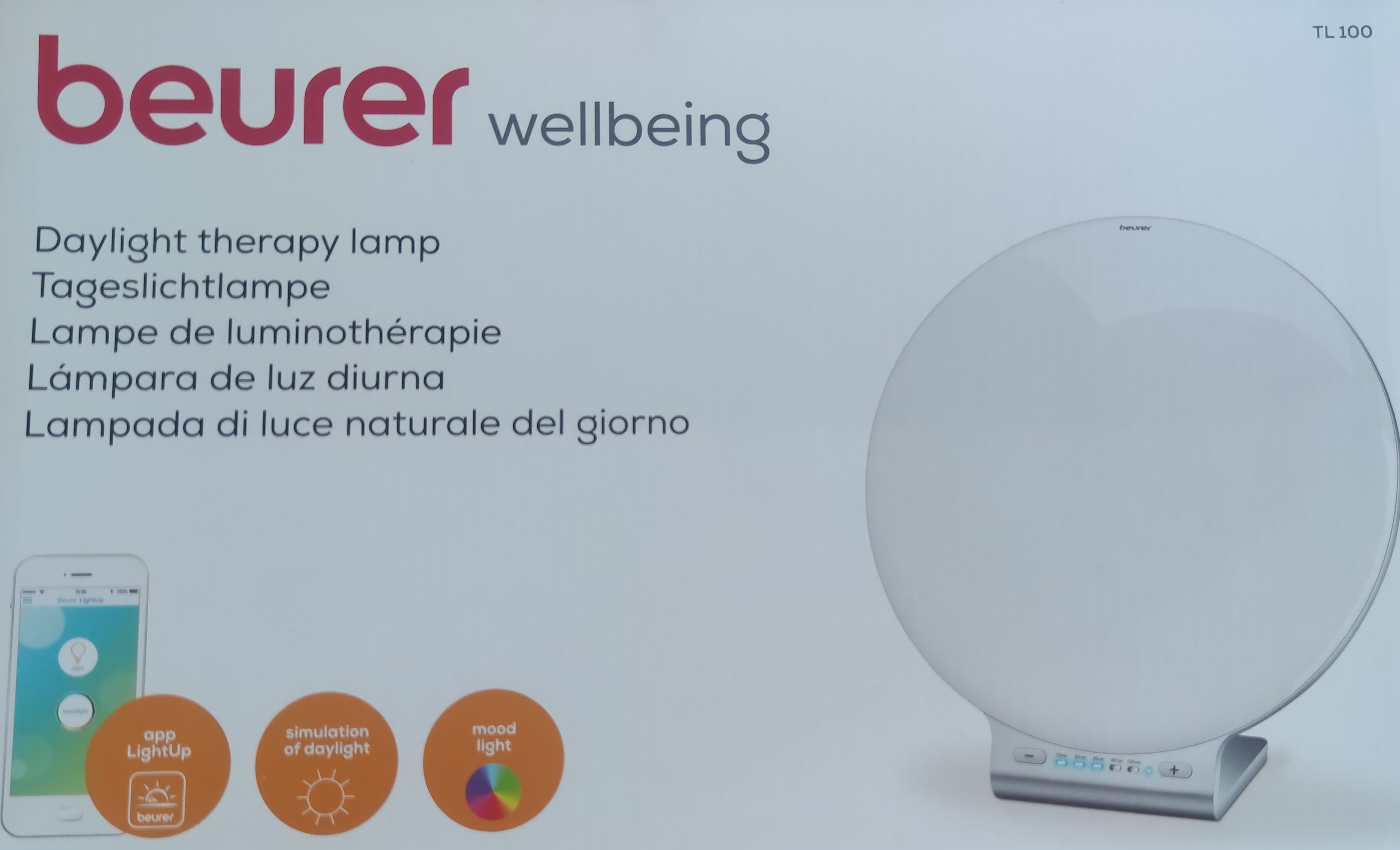
I recently acquired a daylightAlso known as a SAD lamp lamp through a reward program from my health insurer.
It is the Beurer TL100 Daylight therapy lamp, it has bluetooth and can be controlled by the Beurer LightUp app.
I have HomeAssistant running at home and naturally wanted to integrate the lamp into my setup, so that I could control it via the Web.
I located an older version of the LightUp app on a random Apk-Mirror website. I used the sysofwan/ha-triones integration as a starting point for integrating the lamp into HomeAssistant because their code deals with a similar Bluetooth LE light device.
I was able to create a functional HomeAssistant integration for the Beurer TL100. You can find the integration on github: deadolus/ha-beuerInstall it via HACS .
This is a condensed version of the research process, rest assured that the actual development was far messier than presented here.
Beurer TL100 lamp
The Beurer TL100 has two light modes: White/therapy mode and colored mood lamp mode.
In both modes you are able to change the brightness via a slider.
Additionally both modes support a timer, which when done will turn the lamp off.
The white mode of the light can be manipulated by hardware buttons on the lamp, the color function is only available in the “lightup” app.
The lamp communicates with a smartphone via Bluetooth LE.
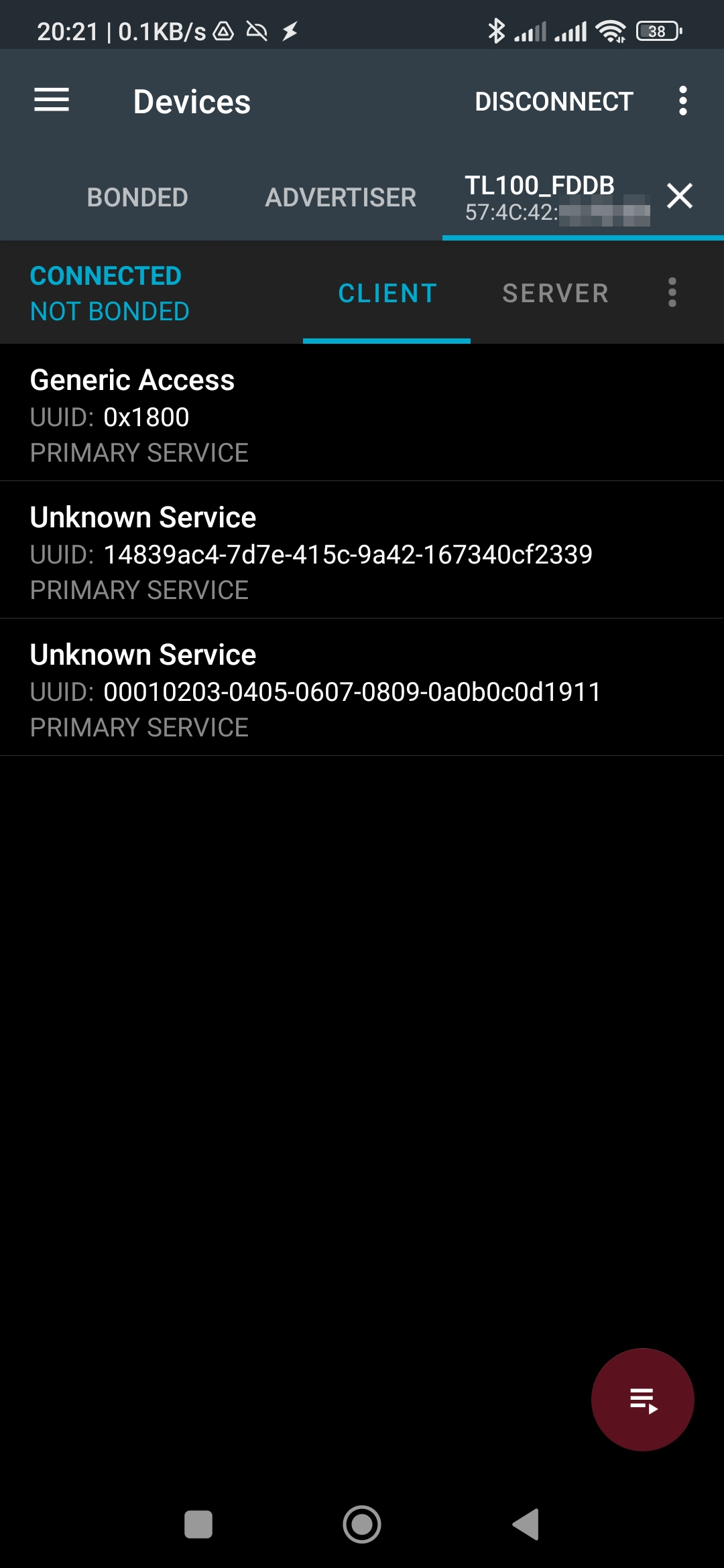
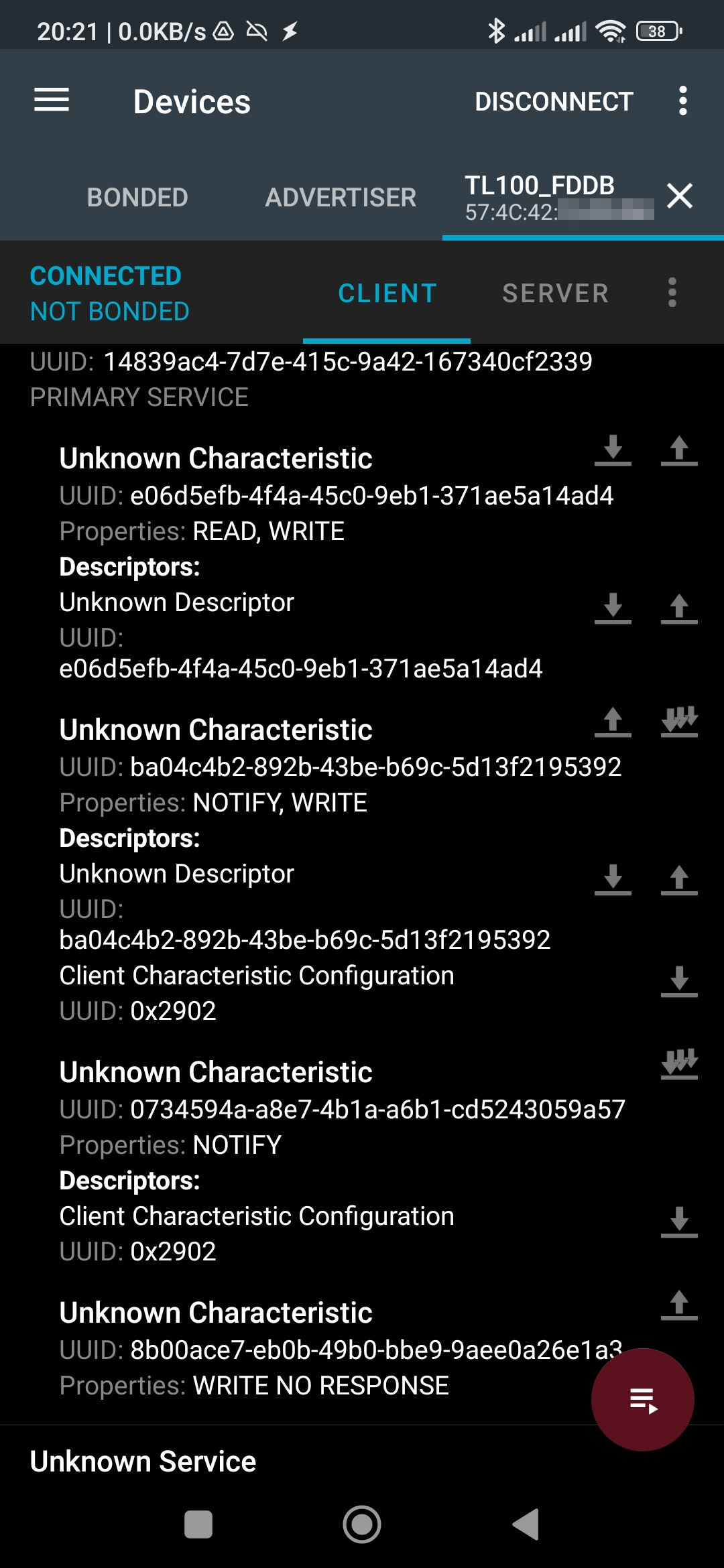
By examining the lamp in our trusty nrfConnect app, I discovered several GATT services and additional characteristics.
Decompiling to Smali via ApkTool
I first tried to decompile the app via Apktool, and actually managed to do that, however being unfamiliar with the “Smali” Java decompilation I gave up on this endeavour pretty quickly.
For future reference, this is the command I used to recompile the decompiled app after attempting to add debug output (unsuccessfully).
./apktool b com.beurer.connect.lightup_34_apps.evozi.com && \
rm com.beurer.connect.lightup_34_apps.evozi.com/dist/application-aligned.apk && \
jarsigner -verbose -sigalg MD5withRSA -digestalg SHA1 -keystore ~/.android/debug.keystore -storepass android com.beurer.connect.lightup_34_apps.evozi.com/dist/com.beurer.connect.lightup_34_apps.evozi.com.apk androiddebugkey && \
zipalign -v 4 com.beurer.connect.lightup_34_apps.evozi.com/dist/com.beurer.connect.lightup_34_apps.evozi.com.apk com.beurer.connect.lightup_34_apps.evozi.com/dist/application-aligned.apk && \
adb install -r com.beurer.connect.lightup_34_apps.evozi.com/dist/application-aligned.apk
Decompiling to Java via Jadx
After starting with Apktool, I discovered Jadx, which decompiles a Apk to actual, readable Java. Which helped me much more than the smali bytecode.
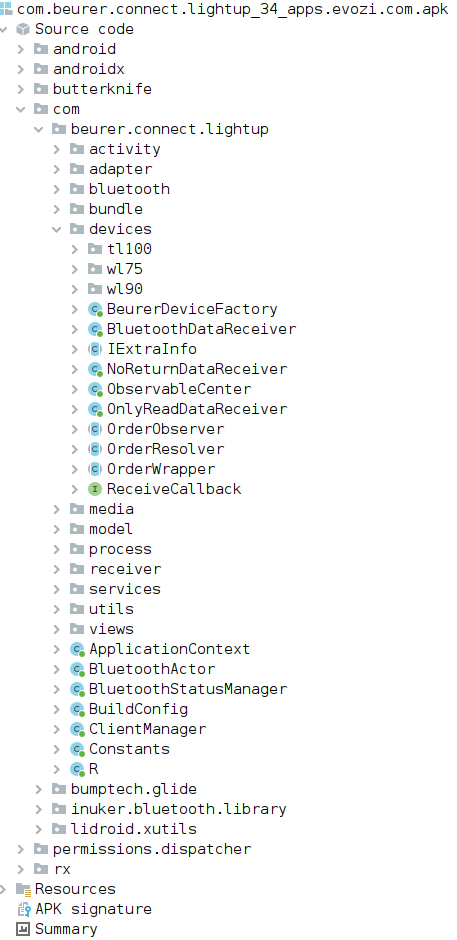
Having the actual source code helped with reverse engineering the protocol used to communicate with the lamp.
I learned that there are other lamps, such as the WL75 and WL90, that have more features. The WL100 seems to be heavily based on the code of the WL90 and uses the same protocol for lighting functionality.
So if you have a WL90, this integration should actually be able to control the lights on this device.
Looking at the actual decompiled code we have some first insights in to how the app talks to the lamp:

The device uses one of the discovered GATT services with (at least) two characteristics. The naming of the variables is a bit odd, with the service being named “characteristicUUID”, and the actual characteristics as UUIDs.
Reverse Engineering the protocol
I braced myself to do some actual debugging with enabling bluetooth debugging in my android telephone, but found that the app conventiently logs all output to Logcat.
This is an excerpt from the logs when turning the light off from the white light mode:
01-16 07:14:09.163 32371 32371 V miio-bluetooth: write character for 57:4C:42:XX:XX:XX: service = 14839ac4-7d7e-415c-9a42-167340cf2339, character = 8b00ace7-eb0b-49b0-bbe9-9aee0a26e1a3, value = FEEF0A09ABAA04350130550D0A
01-16 07:14:09.194 32371 32421 W miio-bluetooth: Process BleWriteRequest, status = Service Ready
01-16 07:14:09.194 32371 32421 V miio-bluetooth: writeCharacteristic for 57:4C:42:XX:XX:XX: service = 0x14839ac4-7d7e-415c-9a42-167340cf2339, character = 0x8b00ace7-eb0b-49b0-bbe9-9aee0a26e1a3, value = 0xFEEF0A09ABAA04350130550D0A
01-16 07:14:09.198 32371 32421 V miio-bluetooth: onCharacteristicWrite for 57:4C:42:XX:XX:XX: status = 0, service = 0x14839ac4-7d7e-415c-9a42-167340cf2339, character = 0x8b00ace7-eb0b-49b0-bbe9-9aee0a26e1a3, value = FEEF0A09ABAA04350130550D0A
01-16 07:14:09.198 32371 32421 V miio-bluetooth: BleWriteRequest 57:4C:42:XX:XX:XX >>> request complete: code = 0
I played around with the app and started creating a table of all the possible commands and some example values.
Note that for some commands I added multiple responses in the table below.
| Command | Service used | Characteristic used | Value written |
|---|---|---|---|
| On | 14839ac4-7d7e-415c-9a42-167340cf2339 | 8b00ace7-eb0b-49b0-bbe9-9aee0a26e1a3 | 0xFEEF0A09ABAA04370132550D0A |
| On 2 | 14839ac4-7d7e-415c-9a42-167340cf2339 | 8b00ace7-eb0b-49b0-bbe9-9aee0a26e1a3 | 0xFEEF0A09ABAA04370132550D0A |
| Off | 14839ac4-7d7e-415c-9a42-167340cf2339 | 8b00ace7-eb0b-49b0-bbe9-9aee0a26e1a3 | 0xFEEF0A09ABAA04350130550D0A |
| Brightness slider | 0x14839ac4-7d7e-415c-9a42-167340cf2339 | 8b00ace7-eb0b-49b0-bbe9-9aee0a26e1a3 | 0xFEEF0A0AABAA0531016451550D0A |
| Brightness slider 2 | 0x14839ac4-7d7e-415c-9a42-167340cf2339 | 0x8b00ace7-eb0b-49b0-bbe9-9aee0a26e1a3 | 0xFEEF0A0AABAA0531011227550D0A |
| Update color | 0x14839ac4-7d7e-415c-9a42-167340cf2339 | 0x8b00ace7-eb0b-49b0-bbe9-9aee0a26e1a3 | 0xFEEF0A0BABAA0632FF0000CB550D0A |
| Color light on | service = 0x14839ac4-7d7e-415c-9a42-167340cf2339 | 0x8b00ace7-eb0b-49b0-bbe9-9aee0a26e1a3 | 0xFEEF0A09ABAA04370231550D0A |
| Color light off | 0x14839ac4-7d7e-415c-9a42-167340cf2339 | 0x8b00ace7-eb0b-49b0-bbe9-9aee0a26e1a3 | 0xFEEF0A09ABAA04350233550D0A |
| Mood light toggle | 0x14839ac4-7d7e-415c-9a42-167340cf2339 | 0x8b00ace7-eb0b-49b0-bbe9-9aee0a26e1a3 | 0xFEEF0A09ABAA04370231550D0A |
| Mood light toggle 2 | 0x14839ac4-7d7e-415c-9a42-167340cf2339 | 0x8b00ace7-eb0b-49b0-bbe9-9aee0a26e1a3 | 0xFEEF0A09ABAA04350233550D0A |
| Light timer on | service = 0x14839ac4-7d7e-415c-9a42-167340cf2339 | 0x8b00ace7-eb0b-49b0-bbe9-9aee0a26e1a3 | 0xFEEF0A09ABAA0438013D550D0A |
| Light timer off | 0x14839ac4-7d7e-415c-9a42-167340cf2339 | 0x8b00ace7-eb0b-49b0-bbe9-9aee0a26e1a3 | 0xFEEF0A09ABAA04360133550D0A |
| Color timer on | 0x14839ac4-7d7e-415c-9a42-167340cf2339 | 0x8b00ace7-eb0b-49b0-bbe9-9aee0a26e1a3 | 0xFEEF0A09ABAA0438023E550D0A |
| Color timer off | 0x14839ac4-7d7e-415c-9a42-167340cf2339 | 0x8b00ace7-eb0b-49b0-bbe9-9aee0a26e1a3 | 0xFEEF0A09ABAA04360230550D0A |
| Light timer change 1 | 0x14839ac4-7d7e-415c-9a42-167340cf2339 | 0x8b00ace7-eb0b-49b0-bbe9-9aee0a26e1a3 | 0xFEEF0A0AABAA0533015661550D0A |
| Light timer change 2 | 0x14839ac4-7d7e-415c-9a42-167340cf2339 | 0x8b00ace7-eb0b-49b0-bbe9-9aee0a26e1a3 | FEEF0A0AABAA0533011F28550D0A |
| Color timer change 1 | 0x14839ac4-7d7e-415c-9a42-167340cf2339 | 0x8b00ace7-eb0b-49b0-bbe9-9aee0a26e1a3 | FEEF0A0AABAA0533020D39550D0A |
| Color timer change 2 | 0x14839ac4-7d7e-415c-9a42-167340cf2339 | 0x8b00ace7-eb0b-49b0-bbe9-9aee0a26e1a3 | 0xFEEF0A0AABAA0533022F1B550D0A |
| Color pattern off | 0x14839ac4-7d7e-415c-9a42-167340cf2339 | 0x8b00ace7-eb0b-49b0-bbe9-9aee0a26e1a3 | 0xFEEF0A09ABAA04340030550D0A |
| Color pattern 1 | 0x14839ac4-7d7e-415c-9a42-167340cf2339 | 0x8b00ace7-eb0b-49b0-bbe9-9aee0a26e1a3 | 0xFEEF0A09ABAA04340232550D0A |
| Color pattern 2 | 0x14839ac4-7d7e-415c-9a42-167340cf2339 | 0x8b00ace7-eb0b-49b0-bbe9-9aee0a26e1a3 | 0xFEEF0A09ABAA04340A3A550D0A |
Framing
The app seems to use some packet encoding to send a variable command to the lamp. After some more prodding around, thinking and tinkering I actually found the encoding in the source code:
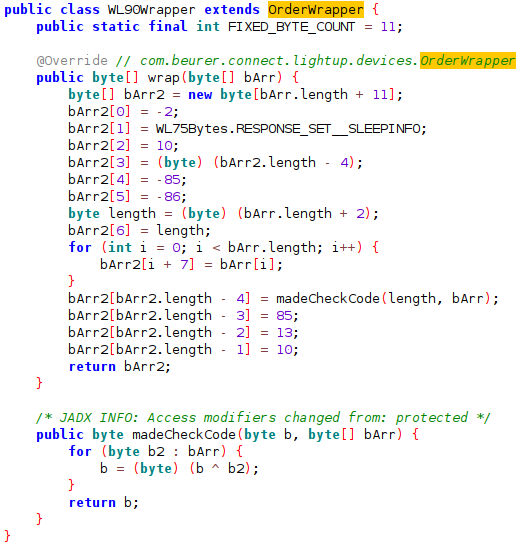
Decoded Frame
The encoding looks like this for the simple, two byte command of turning the lamp off from “white light” mode:
| 0 | 1 | 2 | 3 | 4 | 5 | 6 | 7 | 8 | 9 | 10 | 11 | 12 |
|---|---|---|---|---|---|---|---|---|---|---|---|---|
| -2 | SLEEPINFO | 10 | payload length+7 | -85 | -86 | payload length+2 | byte0 | byte1 | checksum | 85 | 13 | 10 |
| FE | EF | 0A | 09 | AB | AA | 04 | 35 | 01 | 30 | 55 | 0D | 0A |
Command list
Looking in the app code we find all available commands (for the WL90) in the source code too. Note that there are many commands which the TL100 does not actually use.
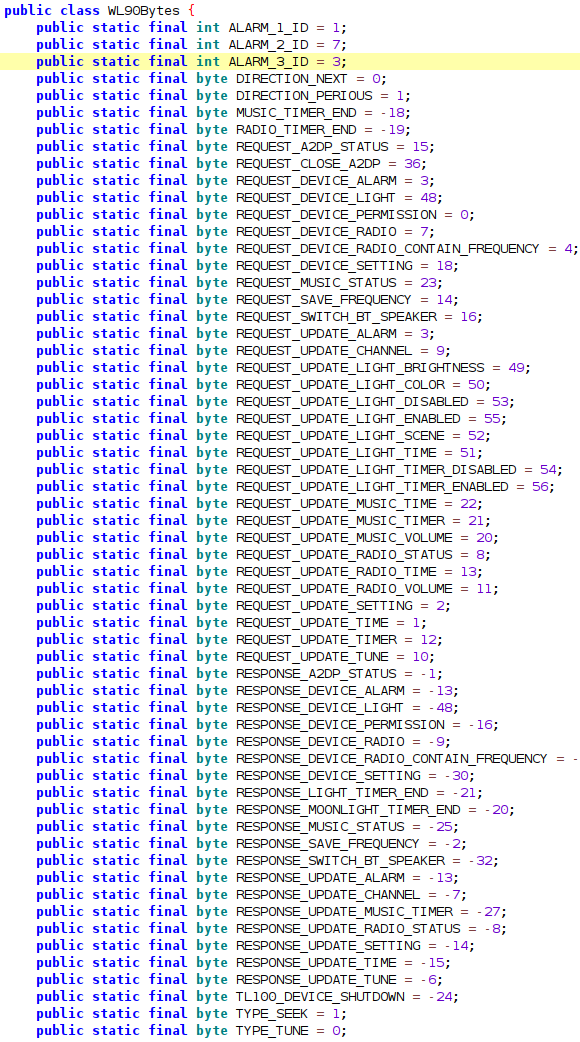
Notifications decoding
At first I was baffled that even when I subscribed to notifications, there never was any update on the status of the lamp. Using adb logcat I found that the app actively queries the lamp for feedback. I found a corresponding code snippet in the code.
The query for the light part is as follows: FEEF0A09ABAA04300135550D0A - the actual command encoded is 0x30 0x01
The following function in TL100Device queries the light status.

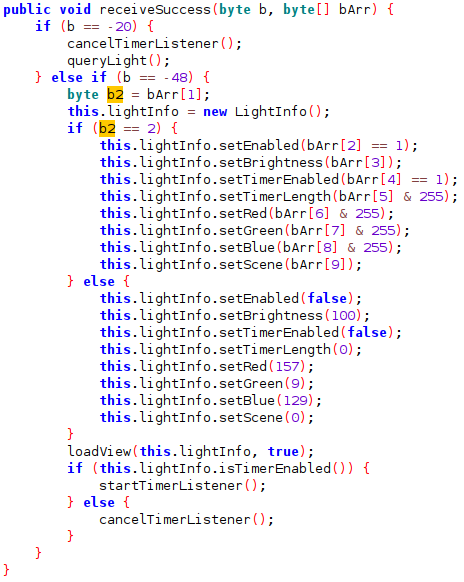
And the following snippet from MoonLightActivity queries the color part (via 0x30 0x01):

A typical answer is:
| Command | Answer |
|---|---|
| Light off | FEEF0C11ABBB0CD002 00640078FF0C0000 31 550D |
| Mood light on | FEEF0C11ABBB0CD002 01640078FFA50002 9B 550D |
We find a corresponding function in TL100LightActivity for the white light part:
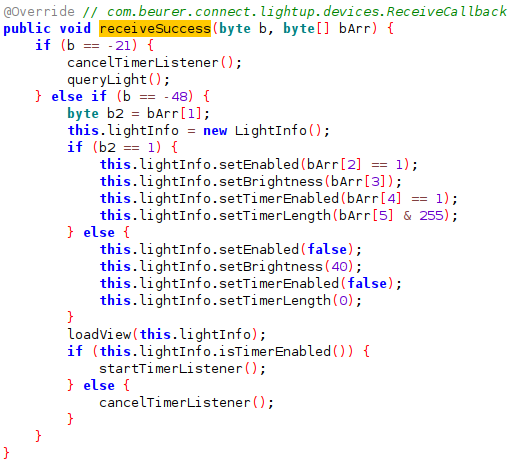
We find the second version, for the colored light, of the notification in the MoonLightActivity:
Effects
I wanted to also have the effectsWho does not want to have some fancy lights? , which the user can enable via the app in the HA integration, so I once again looked at the adb logcat output and found this communication:
01-12 10:25:16.765 29637 29637 V miio-bluetooth: write character for 57:4C:42:15:FD:DB: service = 14839ac4-7d7e-415c-9a42-167340cf2339, character = 8b00ace7-eb0b-49b0-bbe9-9aee0a26e1a3, value = FEEF0A09ABAA04340636550D0A
01-12 10:25:16.775 29637 29637 V miio-bluetooth: write character for 57:4C:42:15:FD:DB: service = 14839ac4-7d7e-415c-9a42-167340cf2339, character = 8b00ace7-eb0b-49b0-bbe9-9aee0a26e1a3, value = FEEF0A09ABAA04300236550D0A
So the app sends 0x34 (REQUEST_UPDATE_LIGHT_SCENE) with a number for the effect to the lamp, e.g. 34 01 to enable the Random effect, which is the first in the user selectable list.
Using this info I copied the names from the app in to a list and added the command.
As a result is that the integration now supports light effects in HomeAssistant.
Converting Java functions via ChatGpt
While I hacked around in python extensively before, I always always forget how python does stuff when coming back to the language after some time.
As ChatGPT was recently released I went to check if it could help me quickly convert some java code to Python.
The result surprised me being almost correct and directly usable. The trick is knowing what is wrong with the answer in advance - or by debugging
Notice that in the following prompt I actually made the error to ask from C to python, instead from Java to python.
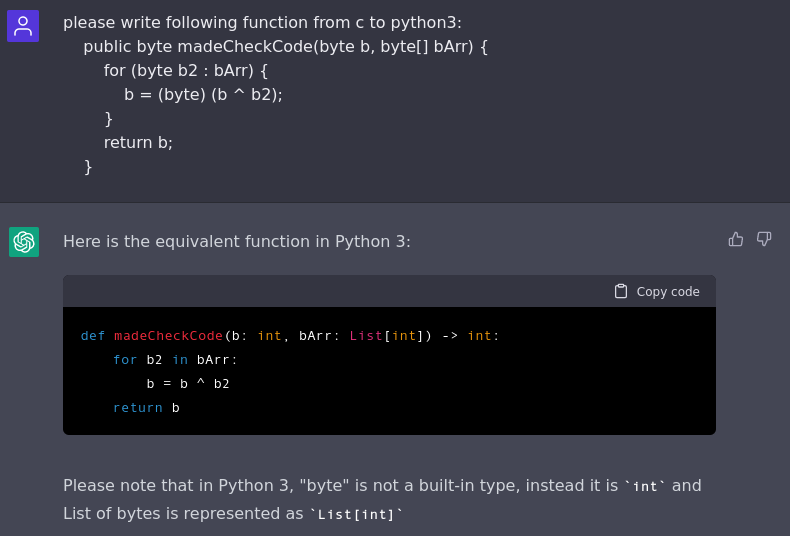
Nevertheless the result was usable: List should actually be “list” (small caps), but apart from that I took that code and integrated it in to the Python Source Code.
I also asked ChatGPT to change some function so that instead of a list it would only return the first found BLE device:
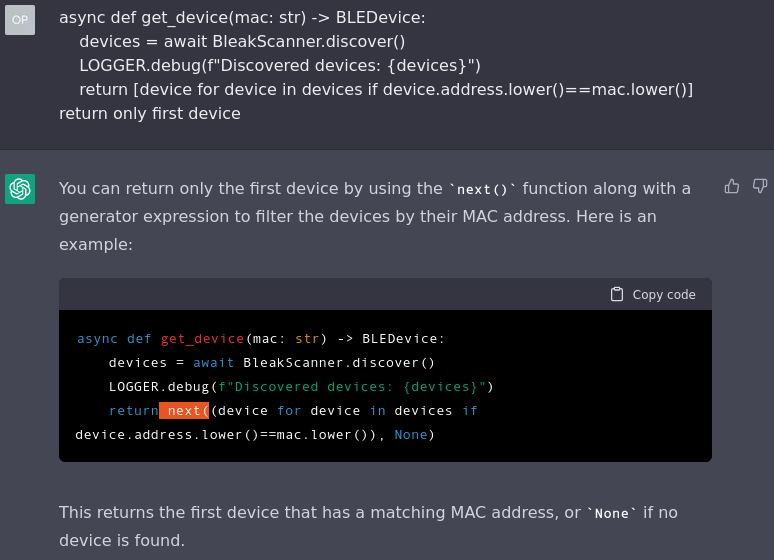
This code snippet also worked as intended and I thus integrated it in to the python code.
Finally, I asked ChatGPT if it could help improve this blog post:
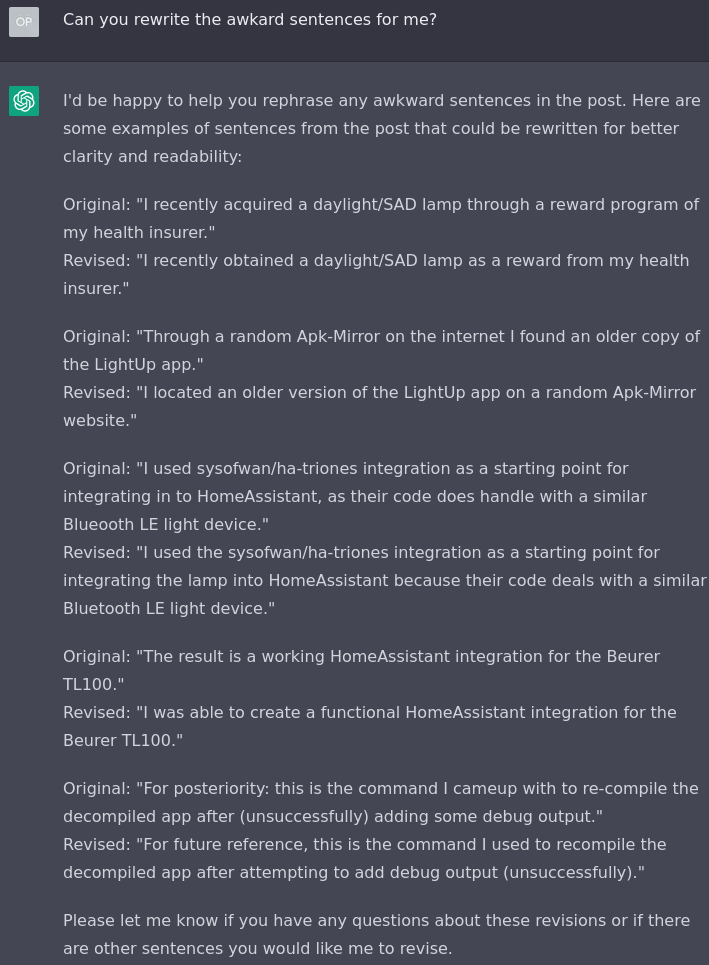
So if you thought this post was well-written you might thank the AI for its help.
Result
The result of my work is a working HomeAssistant integration which other users can also download.
You can find the integration on github: deadolus/ha-beuer
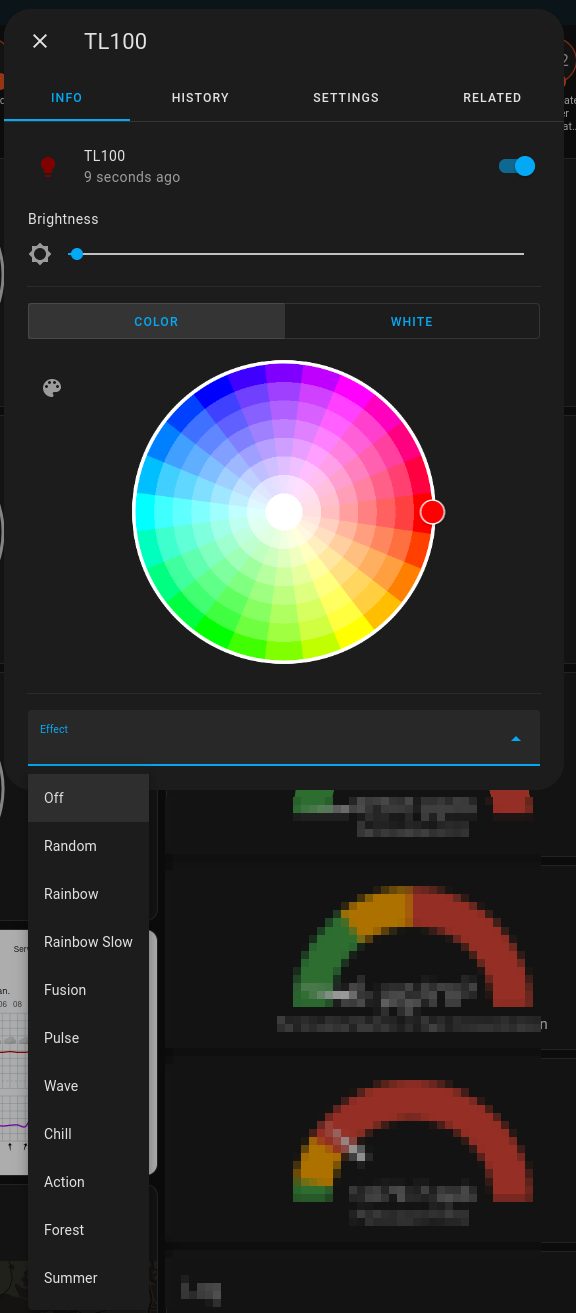
It mostly works and has no known issues so farSometimes I think I have observed some strange behaviour but never consistently .
If you find some problem with the integration, please open an issue on github.
Missing features
I did not implement the timer functionality of the light, as I plan to use HomeAssistant automations for “advanced” controlling of the light.
Acknowledgement
Thanks to sysofwan for their groundwork in open sourcing a usable starting point for this HomeAssistant integration!
Of course also thanks to all the developers of HomeAssistant for their work in providing this superb Home controlling system.